

What Is a Self-Ordering Kiosk?
Definition
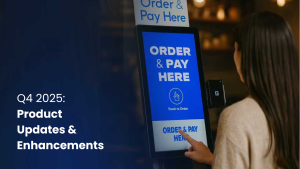
A self-ordering kiosk is a digital terminal designed for customers to use directly. These units are typically equipped with a touchscreen interface that allows guests to browse a menu, customize their selections, and pay for their order without needing assistance from a staff member. They are often found in restaurants and other high-traffic locations to help manage the flow of customers and simplify the point of sale process. When a guest completes an order, the information is usually sent straight to the business point of sale system and then to the kitchen for preparation.
What Self-Ordering Kiosks Are Used For?
These terminals are used to make the ordering process more straightforward for both the customer and the business. By giving guests a way to place orders on their own, kiosks help manage wait times and reduce the potential for communication errors. For greater restaurant automation, they are frequently used to handle high volumes of customers during busy periods, ensuring that orders remain accurate while the kitchen stays busy.
How a Self-Ordering Kiosk Works
A typical self-ordering kiosk follows a specific sequence to ensure the order is handled correctly:
- Customer interaction: A guest uses the touchscreen to look through the digital menu.
- Order selection and customization: The guest chooses their items and makes any necessary changes, like adding extra toppings or requesting substitutions.
- Payment processing: The guest pays for the order at the kiosk using an integrated card reader or a contactless payment option.
- Order routing: Once the payment is approved, the system sends the order to the point of sale system and then to the kitchen display or printer.
This process helps remove delays and reduces the need for manual data entry by staff.
Key Benefits of Self-Ordering Kiosks
There are several common advantages to using this technology:
- Better order accuracy: Since customers enter the details themselves, there is less room for misunderstanding.
- Faster service: The speed of processing orders increases, which is helpful when the business is crowded.
- Operational efficiency: Staff members can focus on preparing food or helping guests in other ways instead of just taking orders.
- Higher average order value: Digital menus can use visual cues to suggest additional items or upgrades to the customer.
- Consistent experience: Every guest sees the same menu, pricing, and options presented in a uniform way.
Common Features and Capabilities
Most systems include a standard set of features to support busy environments:
- Digital menu management: Operators can update prices and menu items from a central location and see those changes immediately on all kiosks.
- Integrated payments: The hardware supports credit cards, debit cards, and mobile wallet payments.
- Hardware flexibility: Units come in different forms, such as countertop models, wall-mounted versions, or freestanding floor units.
- System connectivity: The software connects with existing point of sale systems so that orders are included in regular business reports.
Where Self-Ordering Kiosks Are Used
This technology is used across a variety of industries:
- Quick-service and fast-casual restaurants.
- Coffee shops, cafes, and food courts.
- Sports stadiums and large entertainment venues.
- Hotels and other hospitality settings.
- Retail stores that offer assisted checkout or special ordering.
While they are most common in the food industry, the technology can be adapted for almost any service-oriented business.
Self-Ordering Kiosks vs Other Ordering Methods
Self-ordering kiosks are distinct from other digital options like mobile apps or tabletop kiosks. Kiosks are built for high-volume, on-site use and do not require the customer to have their own device or download software. Mobile ordering is typically used for people who want to order ahead or are off-site. Many businesses use both kiosks and mobile platforms to give their customers more choices.
Examples of Self-Ordering Kiosk Providers
Several companies provide these solutions, each with different hardware and software options. Examples include:
- Square: Provides tablet-based systems that work within its existing payment ecosystem.
- Toast: Focuses on restaurant-specific kiosks that connect directly to kitchen displays.
- INFI: Offers a growth platform that unifies kiosk and online ordering with guided implementation for operators.
- Clover: Supplies self-service options tailored for small to medium-sized businesses.

