

The menu can finally
answer “can I eat this?”
Allergens, dietary tags and calories now live on the item itself — down to the size and the protein a guest picks. Set them once in the console and they show up on the kiosk, in online ordering and in your branded app, with a filter that quietly hides anything a guest can’t eat.
The question that stops the line.
“Let me go ask.”
The guest asks at the counter. The cashier walks back. The line stops. And the answer that comes back is often a shrug — the person who actually knows the recipe is not on shift.
Tap “Peanut”. Done.
The guest picks what to avoid and the menu redraws around them — items and options containing it disappear. What is left states exactly what it contains, on the same screen they were already ordering from.
AI writes the first draft. You sign off on it.
The real console, start to finish: INFI scans the item, suggestions land as chips you accept or drop, and the saved allergens, dietary tags and calories drop into the item’s own table.
-
Open the item. INFI reads it.
Hit Nutrition & Dietary on any item and the fields fill themselves in. One scan per price option.
-
Accept what’s right. Fix what isn’t.
Suggestions land as chips — allergens, dietary tags, an estimated calorie count. Accept All, or keep only the ones you agree with.
-
Set each size, or copy one across.
Every size gets its own row. When they match, “Use this for all variation” copies one across. Nothing reaches a guest until you save.
One menu record. Three guest screens.
At the kiosk, nobody has to ask a stranger
The funnel opens Menu Filter: dietary needs on top, allergens to avoid below. Apply it and the board redraws — no queue held up, no conversation they did not want to have.
- Tags render on every card in the list
- Filter count rides on the toolbar icon
- Works in every kiosk language
On the web, it survives the share
The filter is a full page, the choices stay pinned above the menu as removable chips, and the header counts what is left — “2 of 63 items match”.
- Chips stay visible while they browse
- One tap to remove a filter or clear all
- Same tags on the item detail
In your app, it is remembered, not re-asked
The same sheet, native. Regulars set it once and the menu simply opens right from then on.
- Filter badge on the menu toolbar
- Per-section counts as the list narrows
- Tags carry into the item sheet
Allergens follow the choice, not just the dish.
A dish-level tag is useless the moment there are choices — the tacos read “Vegan” right up until someone picks the steak.
Pick Bulgogi Steak and the banner reads “Contains: Egg”. Pick Tofu and the dietary tags come with it instead.
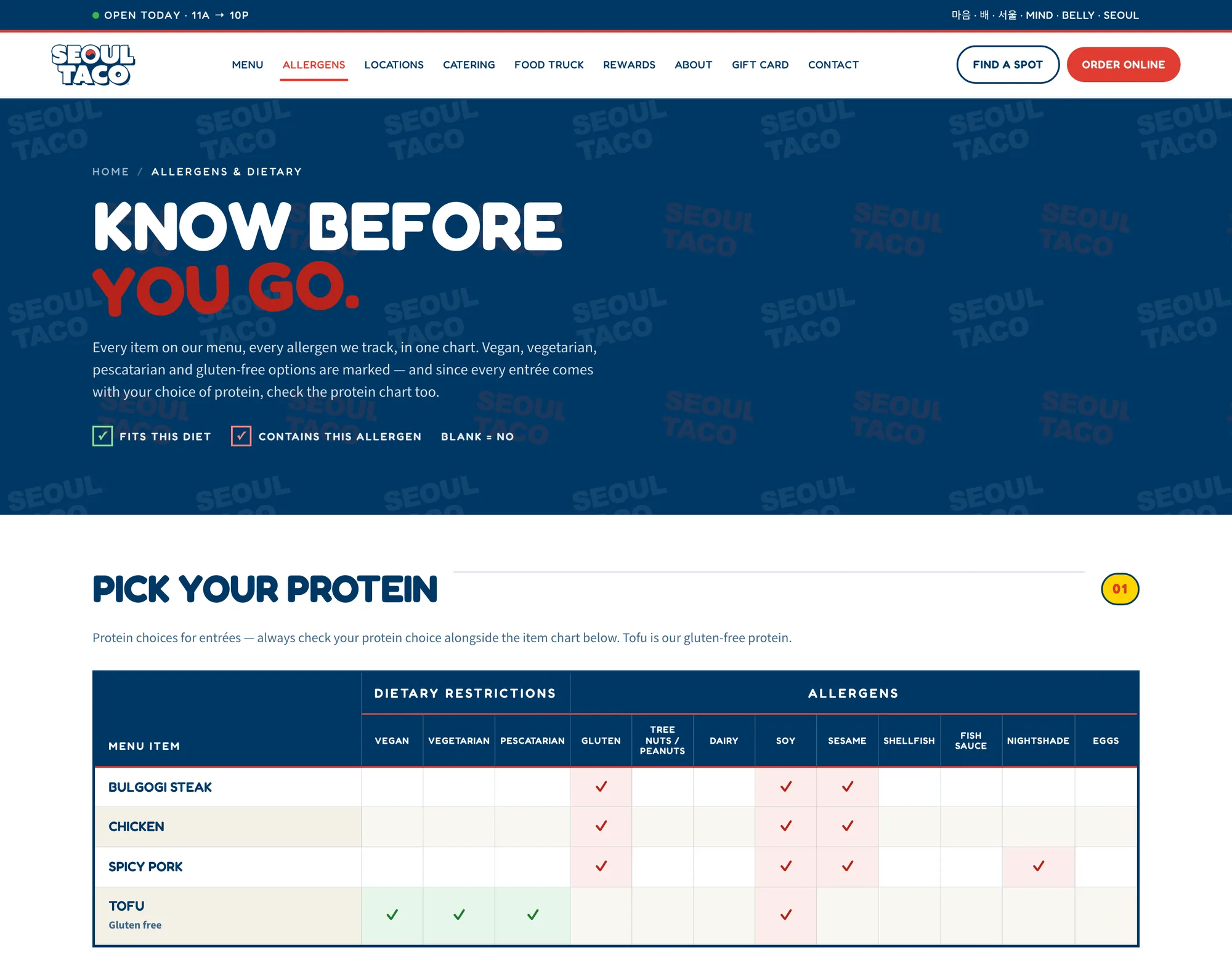
Swipe sideways to see every column →
Seoul Taco runs the same split on their own site — a protein chart before the dish chart, because the answer changes with the protein. See the live page →
Order like a guest who can’t have peanuts.
Dietary needs
Items matching at least one will display.
Avoid these allergens
Items containing what you pick here are hidden.
Nothing on this sample menu matches all of that — which is exactly what a guest needs to find out before they queue, not after.
Sample menu, for illustration. On a real INFI menu the filter runs on your own items and options. Filters apply to base items; customizations may alter ingredients — allergen and dietary info is for reference only.
The same tags go out and find people.
“Vegan options near me” is high intent and barely contested. INFI writes it up for both, naming only the dishes that carry the tag.

Vegan at Seoul Taco, River North
Pick Tofu on the 3 Street Tacos or the Gogi Bowl — then Chips & Salsa Verde, a Single Street Taco or White Rice alongside.
Dietary tags reflect our recipes — our kitchen handles common allergens, so please tell our team about any allergy when you order.
Order Nowseoultaco.com/posts/vegan-options-seoul-taco-river-north
Vegan options at Seoul Taco River North — and what to order first
Which dishes carry the tag, and why the protein you pick decides it.
Dietary tags reflect our recipes — our kitchen handles common allergens, so please tell our team about any allergy when you order.
Order Now- Three dishes, minimumOne tofu bowl does not make a restaurant great for vegans.
- Only tagged dishesThe writer works from a whitelist off the live menu, never the rest of it.
- Never a safety promise“Made without …”, never “allergen-free”. Sentences that promise it get dropped.
Sample copy in the pipeline’s own shape — the dish names and tags are Seoul Taco’s real ones.
This is the one menu field where being confidently wrong is dangerous.
AI suggests. A person publishes.
The console says it out loud before you save: “AI suggestions are estimates. Actual ingredients may vary. Please review and verify accuracy before publishing.” Nothing reaches a guest screen until someone at the restaurant accepts it.
The disclaimer travels with the data
Wherever allergens appear — kiosk, web, app — the same line appears under them: “Allergen info is provided by the merchant for reference only. Please order carefully if you have allergies.”
Honest about what a filter cannot see
Under every filter sheet: “Filters apply to base items; customizations may alter ingredients… for specific dietary needs, please contact the restaurant directly.” Add-ons are the guest’s call, and the product says so.
Blank is never shown as “safe”
An item with variations opens on “May contain allergens — select a price option below to see exact allergens.” The exact list appears once the guest has picked one. Calories you do not have get marked Not Applicable rather than guessed at.
Let’s turn it on for your menu.
Fifteen minutes on your own items — we’ll run the scan on a category live and you can see how close the first draft lands.