Self-Ordering Kiosks for Restaurants: The 2026 Buyer’s Guide
A practical buyer’s guide to self-ordering kiosks for restaurants: what to look for, native POS kiosk vs a dedicated platform, what one costs, and how to choose a kiosk that lifts average ticket.
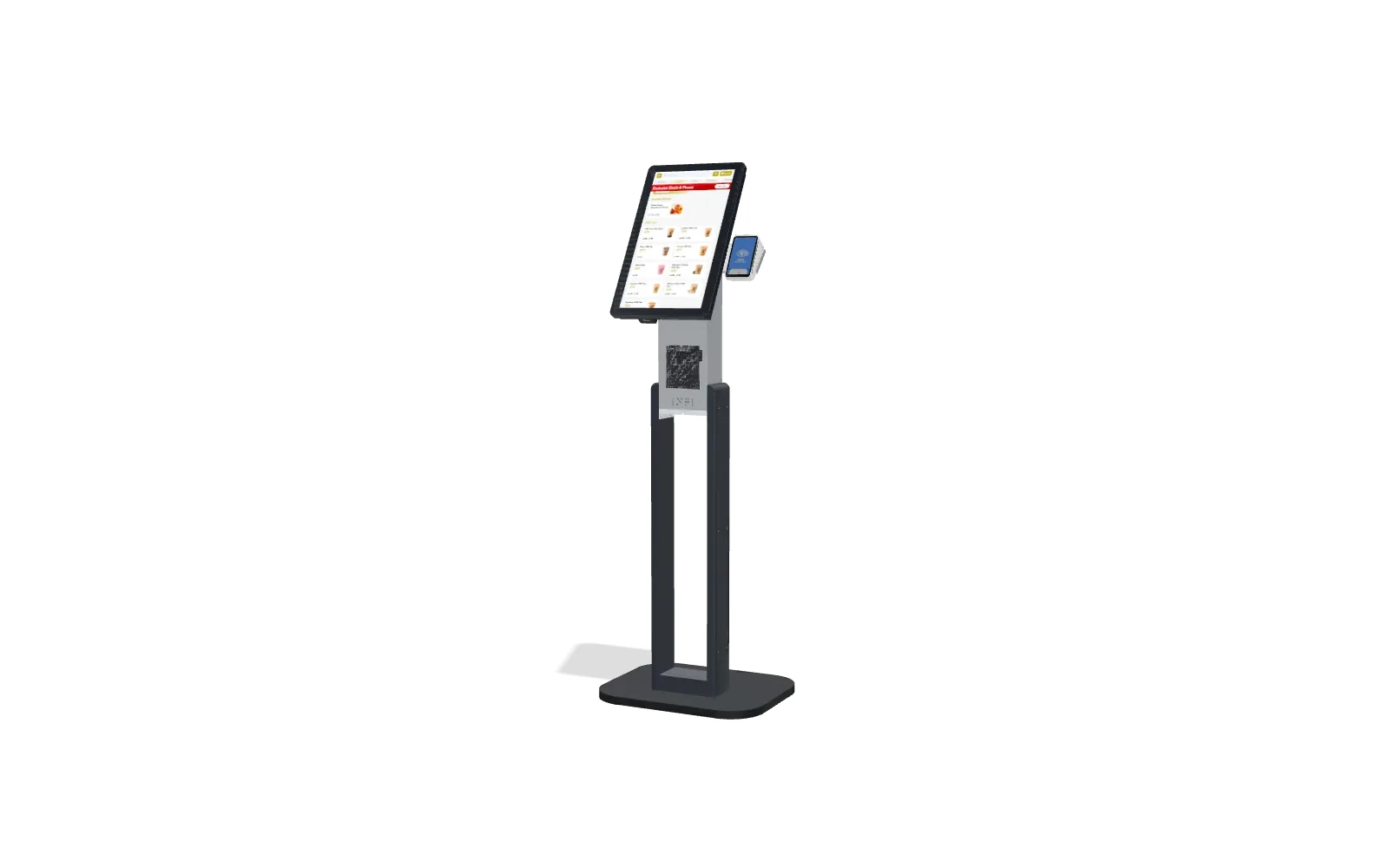
If you’re shopping for a self-ordering kiosk for your restaurant, the hard part isn’t deciding whether to get one — the numbers on that are clear. It’s choosing the right one, because a kiosk is only as good as what it does after the tap: whether it upsells, whether it reads your real menu, whether the order lands cleanly in your kitchen, and whether you keep every dollar it rings up. This guide walks through what actually matters when you buy, so you pick a kiosk that pays for itself instead of a tablet on a stand.
A self-ordering kiosk is a revenue tool, not a cost-cutting gadget. Judge it on average ticket and throughput, not the monthly fee — a kiosk that lifts the average order a couple of dollars pays back its cost many times over.
What a self-ordering kiosk does (and why restaurants buy one)
A self-ordering kiosk lets guests browse your menu, customize their order and pay — at a screen on your counter or floor — without waiting for a cashier. The order fires straight to your kitchen and POS. For the guest it means no line and full control; for you it means three things that show up in the register:
- Higher average ticket. A kiosk offers every add-on and combo on every order, without the awkwardness or inconsistency of a human upsell — which is why kiosk ordering typically lifts average ticket 15–30%.
- More orders, same floor space. Two or three kiosks clear a rush faster than a single register, so you capture sales you were losing to the line.
- Staff where they matter. With transactions handled at the screen, your team moves to expediting, hospitality and food quality instead of ringing people up.
What to look for when choosing a kiosk
This is where kiosks diverge. Two can look identical on the counter and perform completely differently. Run every option past this checklist:
- Real POS integration. It should read your live menu, modifiers and prices from the POS you already run — and write orders back — so you never maintain two menus. See how the POS integration works.
- Smart upsell, not a static list. The whole ROI lives here. Look for per-item add-ons and combos that are actually relevant, not a generic “add fries?” on everything.
- One stack, not point solutions. The best value is a kiosk that shares a menu and loyalty program with your commission-free online ordering and app, so a guest is recognized everywhere.
- Loyalty built in. A kiosk that enrolls and recognizes regulars turns a one-time order into a habit. See cross-channel loyalty.
- Payment on your own account. Money should settle to your merchant account on your normal schedule — the vendor should never sit between you and your deposits.
- Hardware that fits. Countertop vs floor-standing, and enough screens for your peak — not an afterthought.
- A real launch, not a box. Menu build, hardware and staff training matter more than the spec sheet. Ask who sets it up and how long it takes.
Native POS kiosk vs. a dedicated platform
Most major POS systems now offer a first-party kiosk. They’re fine for a basic counter, but they’re usually built to take the order, not to grow it. Here’s the honest trade-off:
- Takes orders and payment at the counter
- Thin or no upsell logic
- Little menu customization
- Loyalty and commission-free online ordering usually cost extra or don’t connect
- Fine if you only need self-checkout
- Runs on top of your POS — Square, Toast, Clover, Lightspeed or HungerRush
- Smart per-item upsell built to lift average ticket
- Kiosk, commission-free online ordering and loyalty share one menu
- Paid on your own account; menu syncs automatically
- The highest-rated ordering partner on the Square App Marketplace (4.9★)
If Square or Toast is your register and their native kiosk feels thin, you don’t have to switch systems — INFI layers the full ordering stack on top. See how it works on Square.
What a self-ordering kiosk costs
Total cost is hardware (a countertop or floor stand plus a tablet) plus the software that runs it, and sometimes payment processing. The number that matters, though, is payback: at a 15–30% lift in average ticket, most kiosks earn back their cost in months, not years. For the full breakdown — hardware ranges, software models and a realistic ROI timeline — see our self-ordering kiosk cost guide.
How to choose, in four steps
Self-ordering kiosk FAQ
Do self-ordering kiosks increase sales?
Yes — it’s the main reason restaurants buy them. Because a kiosk offers relevant add-ons and combos on every single order, it lifts average ticket by roughly 15–30% compared with the counter, on top of clearing lines faster during a rush.
How much does a self-ordering kiosk cost?
It’s hardware (a stand plus a tablet) plus the software to run it. Prices vary by features and how many screens you need, but the figure that matters is payback: a kiosk that raises average ticket usually earns back its cost in months. See the full cost and ROI breakdown.
What is the best self-ordering kiosk for a restaurant?
The best one for you reads your existing POS menu, upsells intelligently, shares loyalty and commission-free online ordering, and settles payments to your own account. For restaurants on Square, Toast, Clover, Lightspeed or HungerRush, INFI adds exactly that on top of your current system — see the INFI self-ordering kiosk.
Can I add a self-ordering kiosk without replacing my POS?
Yes. A platform like INFI layers a kiosk on top of your existing POS — your items, modifiers and prices sync automatically, and you keep your register and payouts exactly as they are. Book a 15-minute demo to see it on your own menu.
Buying a self-ordering kiosk is really buying a bigger average ticket and a faster line — so choose the one that upsells well, runs on the POS you already have, and keeps every order commission-free. See how the INFI kiosk works, check the cost and ROI, or book a demo to see it on your menu.
See what INFI can do for your restaurant
Add self-ordering, online ordering, loyalty, and marketing on top of the POS you already run.
Book a Demo